TheJournal.ie uses cookies. By continuing to browse this site you are agreeing to our use of cookies. Click here to find out more »
Dublin: 11 °C Wednesday 19 June, 2013

Explainer: what do this week’s password leaks mean for you?

What exactly does ‘hashed’ and ‘salted’ mean? And after breaches for LinkedIn, eHarmony and Last.fm this week, how can you make your password stronger?

SEVERAL SECURITY BREACHES have been reported by various websites this week – LinkedIn, eHarmony, Last.fm – which prompted them to urge their users to change their passwords.

Users are also being urged not to use the same password for every site you visit; a pain of course, if you end up trying to remember ten, 15 or more passwords a day. But how can you make sure your password can’t be easily cracked? We’ve put together a rough guide to how to make your password as strong as possible.

Tips for making your password and browsing secure

  • Choose a password that’s longer than six characters and contains a mixture of characters, and try not to use a word that’s found in a dictionary (in any language). Your best bet is to use a password that appears to be a random string of characters.
  • Don’t use the same passwords for all of your online accounts. Security Week reports that a study by Internet security company BitDefender revealed that 75 per cent of people use their email passwords for social networking sites. Using the same password for sites where money is involved, like Amazon or PayPal could lead to all sorts of trouble.
  • Make sure the browsers you use are up to date, and use more than one, like Chrome and Firefox. Security expert Jeremiah Grossman recommends using one for ‘important’ tasks like banking and checking email and using that browser to go directly to a website without surfing the web. That means if your other ‘everyday’ browser is attacked, there won’t be anything too important to find.
  • Use a password manager if you’re (wisely) using a number of different strong passwords. A password manager like LastPass will store all of your important information, requiring you to remember only one ‘master’ password.
  • Avoid using common sequences of letters or numbers, or personal information such as your birthday or your name.

What does all this mean for me?

If you are a LinkedIn, eHarmony or Last.fm user you should change your password, and you should ensure that you don’t use the same password for all of the major sites you use, such as your email account, banking, Facebook etc. It’s not yet known if user names along with passwords were stolen, but Ars Technica and CNET report that it’s likely that this information is in the hackers’ hands.

Be wary of any email purporting to be from one of the affected sites, especially if it contains a link. LinkedIn have already said that they are sending emails to affected users, but that these emails will not contain any links, and they’re warning users to watch out for phishing and spam emails requesting personal information. LinkedIn have also said that they have disabled the affected passwords.

What’s all this about ‘salting’ and ‘hashing’?

LinkedIn have been criticised this week for having their users’ passwords hashed, but not salted. Hashing a password is a way of encrypting a password in case it gets into the wrong hands. LinkedIn were using an algorithm called Secure Hashing Algorithm 1 (or SHA-1), which uses a mathematical process to create a string of letters and numbers based on the original password. Like this:
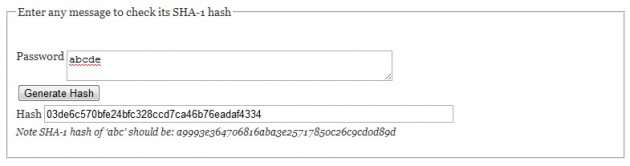
Hash generated via Errata Security’s website

However, it seems that LinkedIn’s passwords weren’t ‘salted’, meaning that it was possible to crack some of the more common passwords. This is done by hackers using dictionaries, collections of (precomputed) encrypted/hashed words or common passwords that make it easy to search for leaked hashes.

Salting is carried out by adding another string of characters to the password before it is hashed, so that hackers have more difficulty matching the encrypted (leaked) passwords against their prebuilt dictionaries. For instance, the resulting hash for the password “monkey” and “monkey-saltstring” would be different and hackers would need to know which salt was used, the position of the salt (the salt can be added on any fixed position, like saltstring-monkey, or m-saltstring-onkey, etc.) and then rebuild their dictionaries taking that into account.

Who’s investigating the breach?

CNET reports that LinkedIn has contacted police about the security breach, while its possible that the Data Protection Commissioners here may also have a role in investigating the incident. The Irish Times has reported that because LinkedIn’s operations base for outside the US is here in Ireland, the Irish Data Protection Commissioner’s Office are now in contact with the company.

Meanwhile The Australian reports that Australia’s privacy commissioner has asked the Data Protection Commissioner’s Office to stay in touch with him. He’s contacted his Irish counterpart and asked to be kept “in the loop”.

Here’s Google’s guide to a strong password:


Music site urges users to change password in latest breach – has yours been leaked?

First LinkedIn, now eHarmony’s passwords ‘compromised’>

Almost 6.5million LinkedIn passwords apparently leaked online>

  • Share on Facebook
  • Email this article
  •  

Read next:

Comments (10 Comments)

  • If you’re using Firefox just get your hand on the LastPass addon. Solves pretty much every problem listed above

    Reply
    • Exactly. LastPass is the best. Addons available for Firefox and Chrome. You can get the mobile premium version for $12 for the year or $20 with Xmarks for all your bookmarks. Then just generate 15-20 character passwords for each site. I’m sometimes truly shocked sometimes by the ‘one’ password people use for all their sites!

      Also, make up one email (Gmail) for all your registrations for SPAM and keep your personal email just for personal email.

      Reply
    • But are you 100% sure LastPass does not sync your passwords with its server in California or some other easily accessible for hackers place?

      Reply
  • Using the on screen keyboard helps with security too,anyone monitoring your activity will not be able to determine the letters as they were clicked on and not typed in. You can get it by typing osk into search

    Reply
    • You only should worry about your keyboard if there is a keylogger on your physical computer, these can be downloaded as a Trojan (a program that acts as it should, or even doesn’t act, with something a bit devious thrown in), and can be sending your key strokes to the creator of the Trojan.
      As well as that, you can also have a Trojan which takes screen shots of what’s on screen periodically, which might not help if you use an on-screen keyboard.

      Basically, all you have to do is try to stay careful, use phrases you’re familiar with for passwords so you can remember them easily, and ensure your anti-virus is up to date on your local computer.

      Reply
  • The deep sadness of some hackers, why in gods name would anyone bother or indeed care about hacking for passwords for a dating site such as E Harmony, the world is indeed a strange place

    Reply
    • Joey, as the article mentions – and hackers know well, people tend to re-use their usernames and passwords for multiple sites. Hackers will attempt to lift username/email/password combinations wherever they can find them, and will subsequently use those credentials to try and take control of juicier accounts, like email and banking ones.

      Think about it. If you’re registered wtih LinkedIn, Last.fm, etc, chances are you’ve given them your email address. Are you using any of those passwords for any other websites? If so, now is a very good time to change it.

      Reply
    • Probably because so many people use the same email address and password for other accounts?

      Reply
  • The most difficult passwords to guess are often the most easy to remember. Picking three friends names at random, such as “John Mick Rory” is a far more secure password than a password like “RaND0m$”. A good website for reference is https://www.grc.com/haystack.htm

    Reply

Add New Comment