Sign in. It’s quick, free and it’s up to you.
An account is an optional way to support the work we do. Find out more.
Sign in. It’s quick, free and it’s up to you.
An account is an optional way to support the work we do. Find out more.
IF YOU DOWNLOAD many apps and have limited space, there will be a time where you will have to delete some to make space.
It happens to the best of us, but sometimes you might want to download one again or you remember a useful app but can’t recall its name.
Whatever the reason, you can view a list of all the apps you’ve downloaded in your account history. You just need to know where to look in the app store.
There can be certain apps that were removed from the store, that might still be downloadable through this method (For example, Flappy Bird can’t be found on the App Store but if you downloaded it before, you could find it through this method).
Alternatively, if you’re sharing an account with (like Family Sharing on iOS), you can hide these apps so nobody else can download them.
iOS
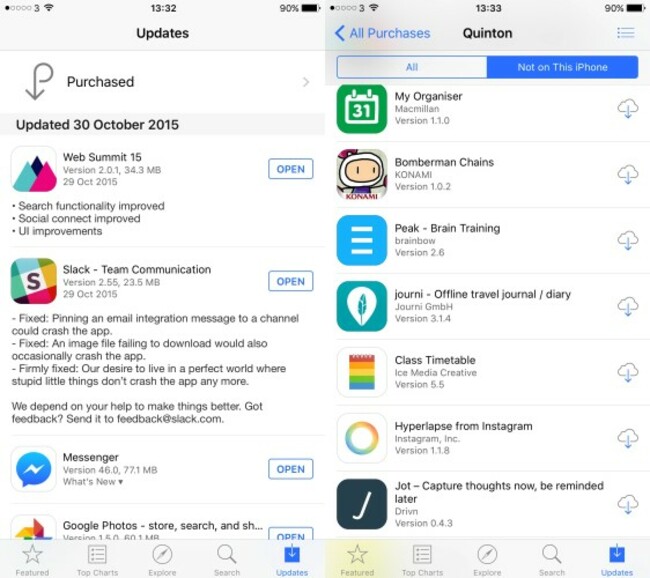
It might not be initially obvious but when you’re in the App Store, you can check all the apps you’ve downloaded by going into the updates section and tapping ‘Purchased’.
Once you’re here, you can view all apps or ‘Not on this iPhone/iPad’ which will show you all the apps you no longer have on your phone.
If you don’t want something appearing in this list, swiping to the left will bring up the hide option.
Android
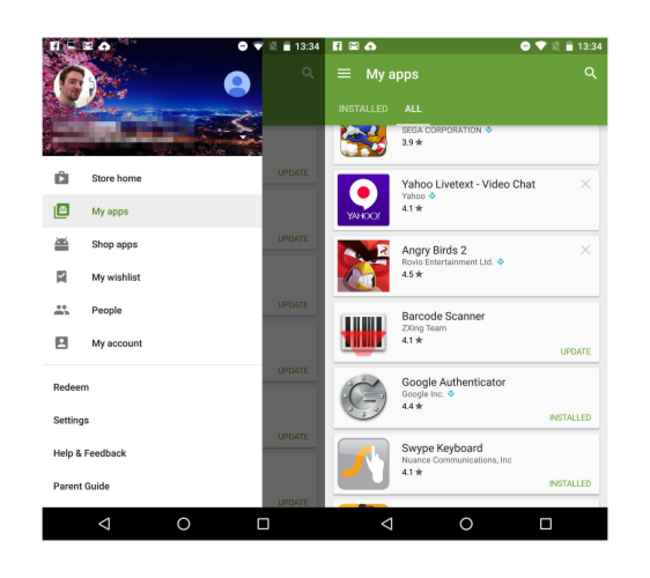
By going into Google Play, bring up the main menu and tap on My Apps. Here you will be able to look at those apps installed on your phone (mainly for updates) and all the apps you’ve downloaded.
On this screen, anything with an x beside it are apps you don’t have on your phone. If you want to remove them from the list, just tap the x and you will be asked if you want to remove it from the list entirely.

To embed this post, copy the code below on your site














have your say