Sign in. It’s quick, free and it’s up to you.
An account is an optional way to support the work we do. Find out more.
Sign in. It’s quick, free and it’s up to you.
An account is an optional way to support the work we do. Find out more.

SOMETIMES FACEBOOK CAN end up overwhelming you. While the news feed organises posts based on your interests (unless you go chronologically), it’s likely there are some things you would rather not see.
If you get an invite for a game like Candy Crush Saga, you may just dismiss it and think nothing of it. If you’re flooded with invites, then there’s a problem.
If that is happening regularly, or you’re getting tired of the same person or page interacting with you, then you should access the ‘blocked’ page in settings.
How to access it
When you go into settings (or by following this link), look to the menu on the left-hand side. The blocking option will be the fifth option from the top. Clicking it will present you with the following options.
Restricted List
When you add people to this list, they can only see the info and posts you’ve made public. Your friends won’t know about this so this is a nice way of restricting their access to your posts.
Block users
If using the ‘restricted list’ isn’t good enough, you can go one step further. Once you block someone, they can’t see any of your activity, interact with you or add you as a friend. Consider this the nuclear option.
Block app invites
Since many free games ask players to add friends for points (or similar benefits), this will ignore any invites from a specific specific friend.
Block event invites
Similar to the last option, only this time it relates to event invites from a specific friend.
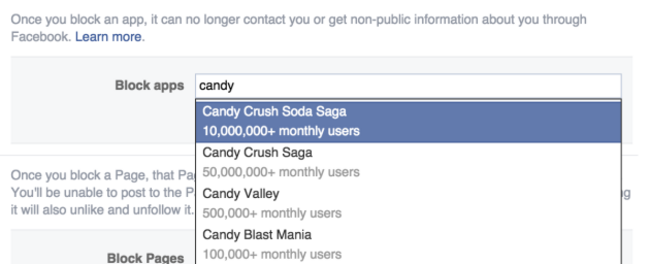
Block apps
You might not think it, but Facebook has quite a number of apps that you can download directly. Yet some can continue notifying you even when you’ve stopped using them. Adding them here prevents them from contacting your or accessing private info from you through Facebook.
Block Pages
Similarly, you can block specific pages, preventing them from interacting with you. It also means you can no longer post on its wall or message it. If you’ve ‘Liked’ a page, blocking it will unlike and unfollow it.

To embed this post, copy the code below on your site














have your say