Sign in. It’s quick, free and it’s up to you.
An account is an optional way to support the work we do. Find out more.
Sign in. It’s quick, free and it’s up to you.
An account is an optional way to support the work we do. Find out more.

Updated 5.08pm
IF YOU USE Twitter often, you probably know how hard it is to find a tweet from a few months or years ago.
The standard search function only brings up the most relevant and recent tweets, meaning you have to trawl through the results to find what you’re looking for.
If that’s the case, you should start using Twitter’s advanced search feature. It allows you to delve deeper into Twitter and find more exact results.
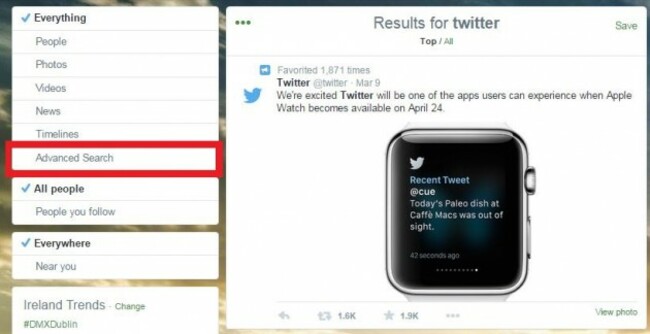
There are two ways to access it: either access search and find it located on the left-hand side or use the direct URL.
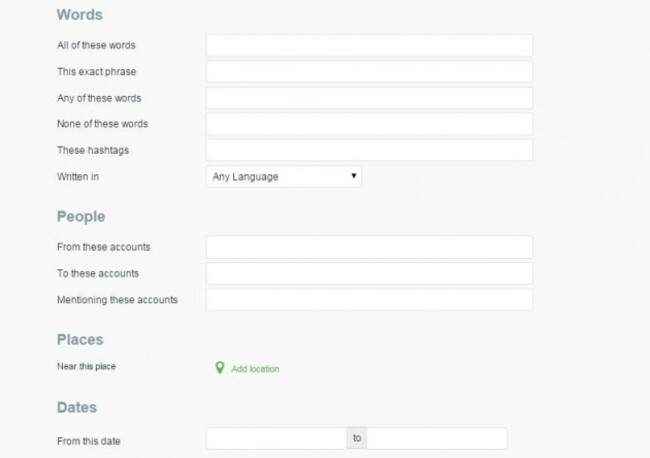
If you want to search your own account, you need to put in your account username first in the ‘from these accounts’ section. If you’re unsure how far you can go back, your profile page will tell you what year and month you joined.
From there, it’s a matter of choosing what keywords, dates and hashtags are necessary.
You can look for positive or negative tweets, but that only highlights tweets with smiling or frowning emoticons instead of keywords.
That’s only scratching the surface of what the feature can offer, but if you vaguely remember a relevant or funny tweet you or someone else posted and don’t want to trawl through your feed, this will save you a lot of time.
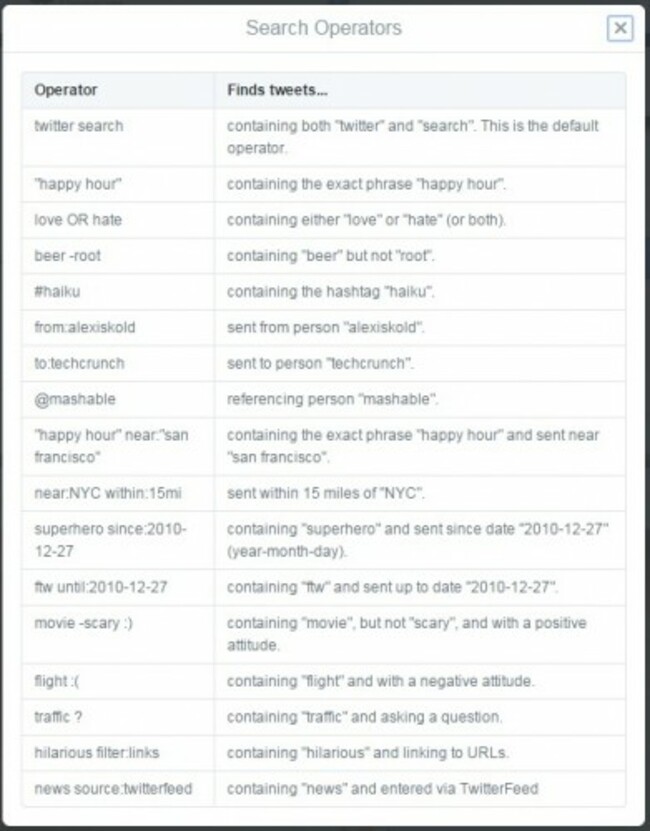
On the apps, it’s better to learn the operating terms as it doesn’t have a similar search feature.
Originally published 12 noon

To embed this post, copy the code below on your site














have your say