Sign in. It’s quick, free and it’s up to you.
An account is an optional way to support the work we do. Find out more.
Sign in. It’s quick, free and it’s up to you.
An account is an optional way to support the work we do. Find out more.

ANYONE WHO HAS used Facebook in recent times will be familiar with the ‘On This Day’ feature that pops up every now and again.
Sometimes they can be nice but other times they may bring up some bad memories like a breakup or job loss. Facebook allows you to turn off notifications but not the feature entirely.
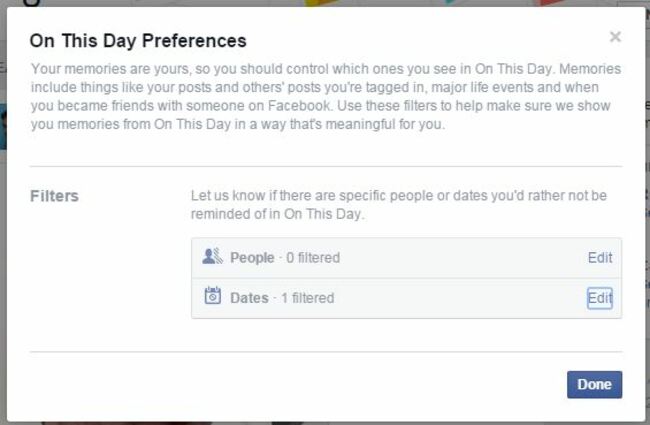
However, there is a way to prevent these memories from surfacing and it’s done on desktop. Go into the On This Day page (you will find it under Apps on the side menu or follow the link here) and click on preferences at the top right-hand corner.
Here you will have the choice of choosing people you don’t want to be reminded about (only useful if they posted something or were tagged) or a specific date. In this case, we’re interested in the latter so click on that.
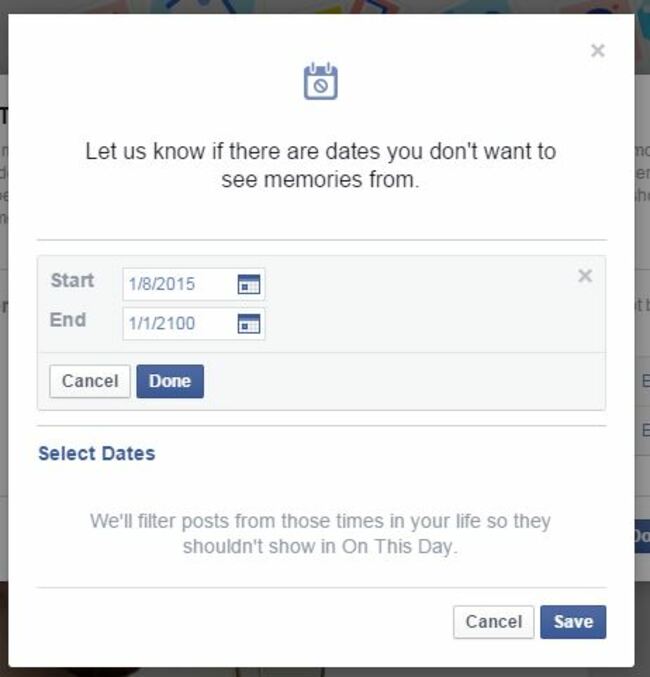
Here you can set the start and end period so for the start, choose any date before 2004 – Facebook was founded that year in case you were wondering – and for the end date, just type in a far-away year.
Save it and you will no more Facebook memories will crop up ever again.

To embed this post, copy the code below on your site














have your say