Sign in. It’s quick, free and it’s up to you.
An account is an optional way to support the work we do. Find out more.
Sign in. It’s quick, free and it’s up to you.
An account is an optional way to support the work we do. Find out more.

QUITE A NUMBER of us use Instagram for photos, but while you can share to Twitter, the best it offers is a URL link. You can upload it as the edited photo ends up in your photo stream, but how many of us go to the trouble of doing that?
There’s a handier way of completing this and it won’t take too long to complete.
We’ve spoken about If This Then That (IFTTT) before and how useful a service it is (we put together a guide about it here as well), but it’s the way you will be able to post your photo directly.
When signed in to IFTTT, select create a recipe, select Instagram and choose ‘any photo you post.’
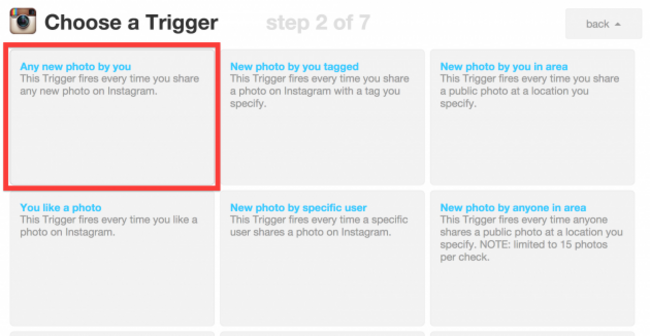
Then select Twitter and choose ‘post a tweet with image.’ You may have to connect your Twitter and Instagram account first but that won’t take long.
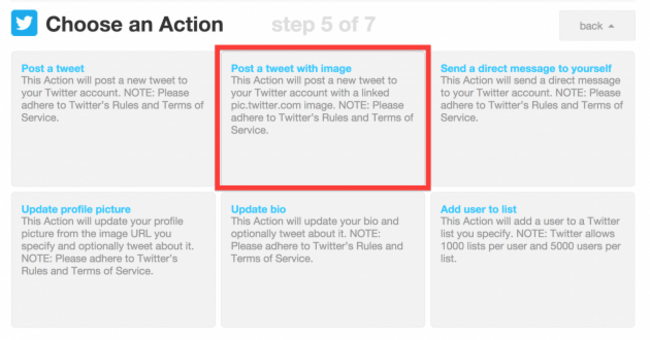
And you’re done. It takes a moment or two to set up but any time you upload a photo to Instagram, the title and image will be tweeted shortly after.
Although, if you don’t feel like going through the trouble of setting it up, this link will automatically set it up for you.

To embed this post, copy the code below on your site













have your say